 Learn VersionPoint
Open the test version
Learn VersionPoint
Open the test versionLesson 87 minutesThe Lake Shuttle, version 3
The record
Answer why does this line read this way? from the paragraph history, older versions and the record, and keep a copy of it all in a project file.
Why it matters
Sooner or later someone asks why a line reads the way it does. The record answers with names, dates, the reviewer's note and your reason, without anyone digging through email.
Watch
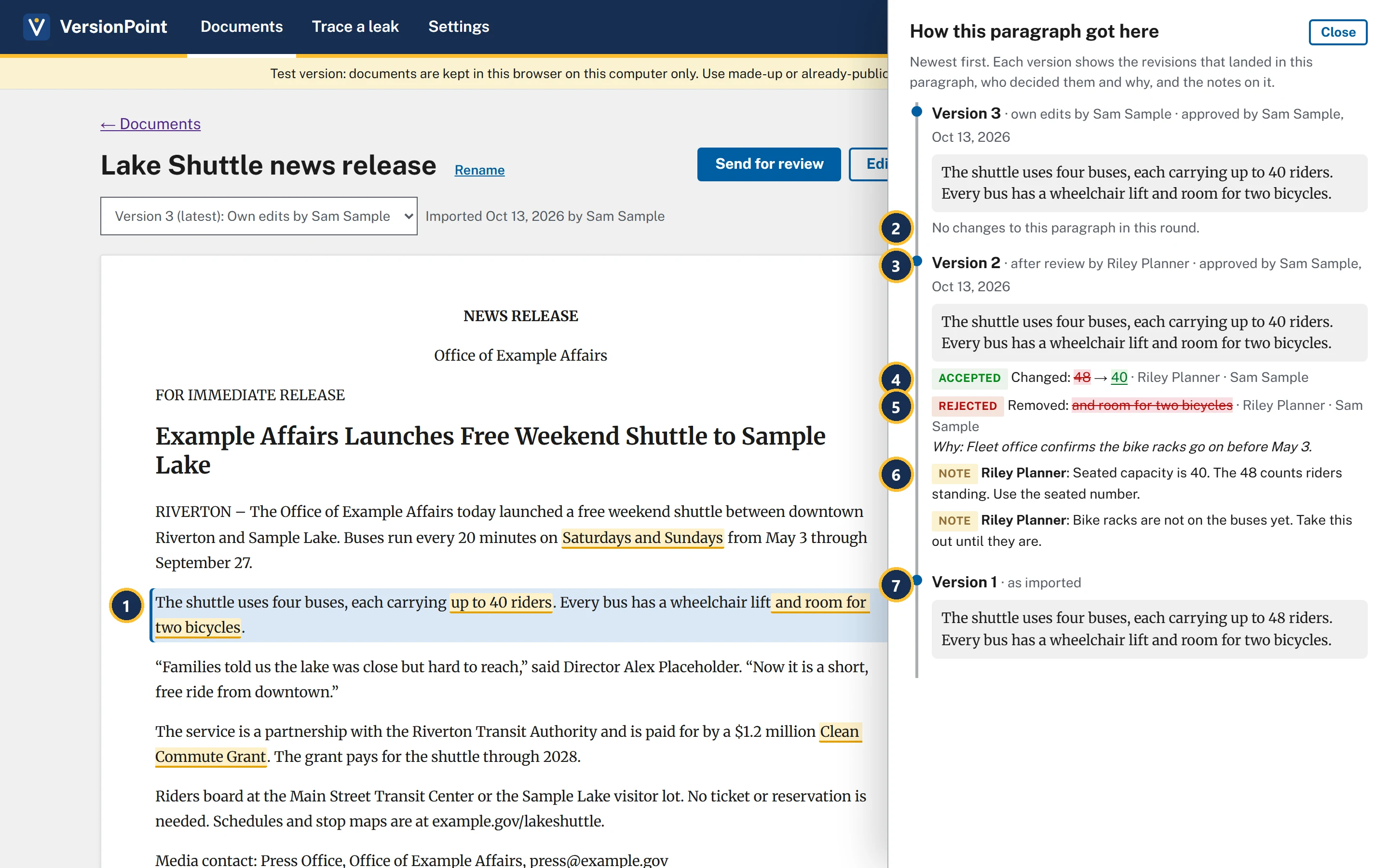
- The paragraph you clicked is highlighted.
- Version 3 didn't touch it: No changes to this paragraph in this round.
- Version 2: whose round it was, who approved it and when.
- Accepted: Riley's change from 48 to 40, with who made it and who decided it.
- Rejected: Riley removed the bicycles, you kept them, and your reason sits right under it.
- Riley's notes on this paragraph: the reviewer's reasons beside yours.
- Version 1 · as imported: the sentence as it first came in.
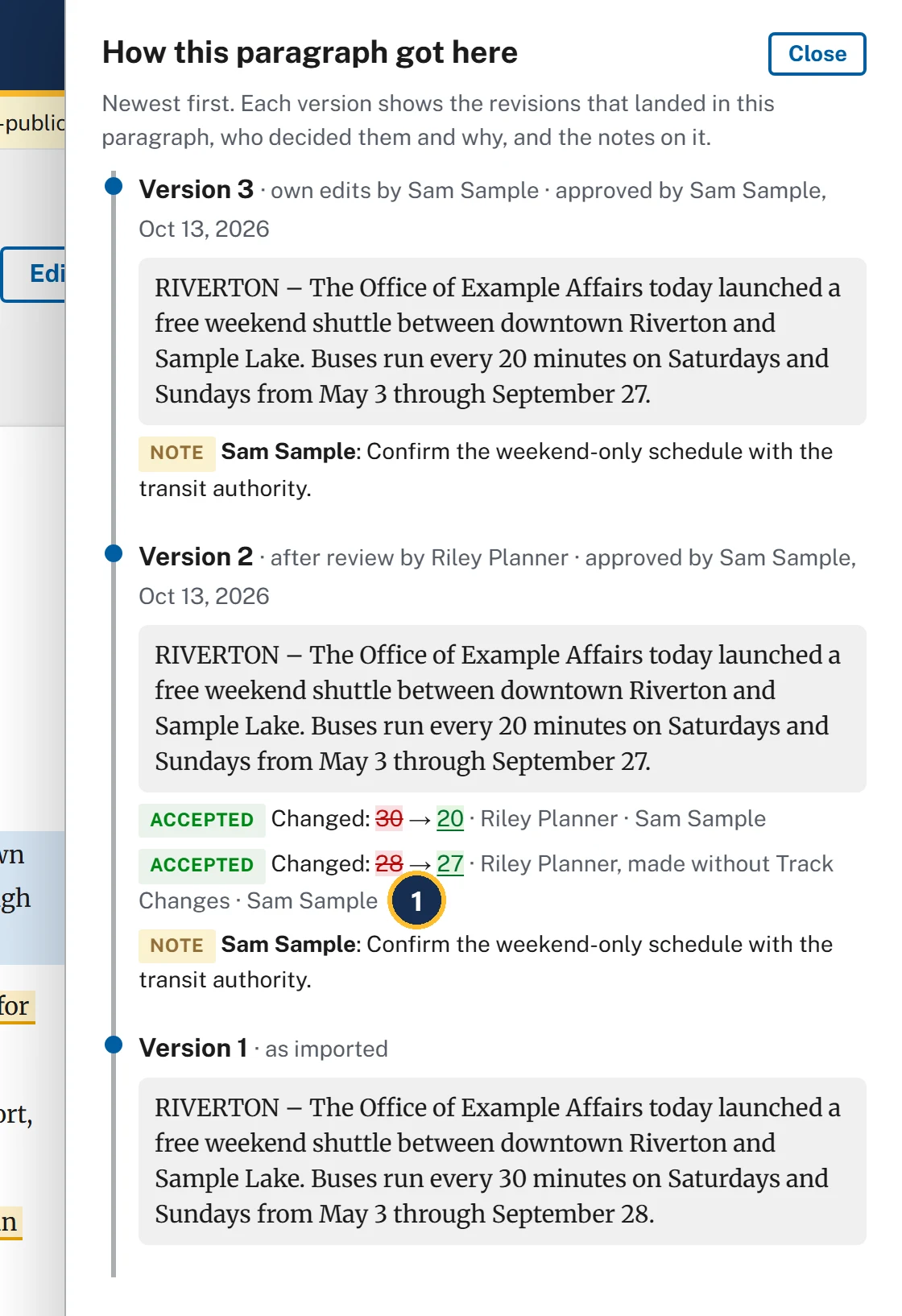
- made without Track Changes: years from now, the record still shows Riley changed the date with tracking off, and that you accepted it.
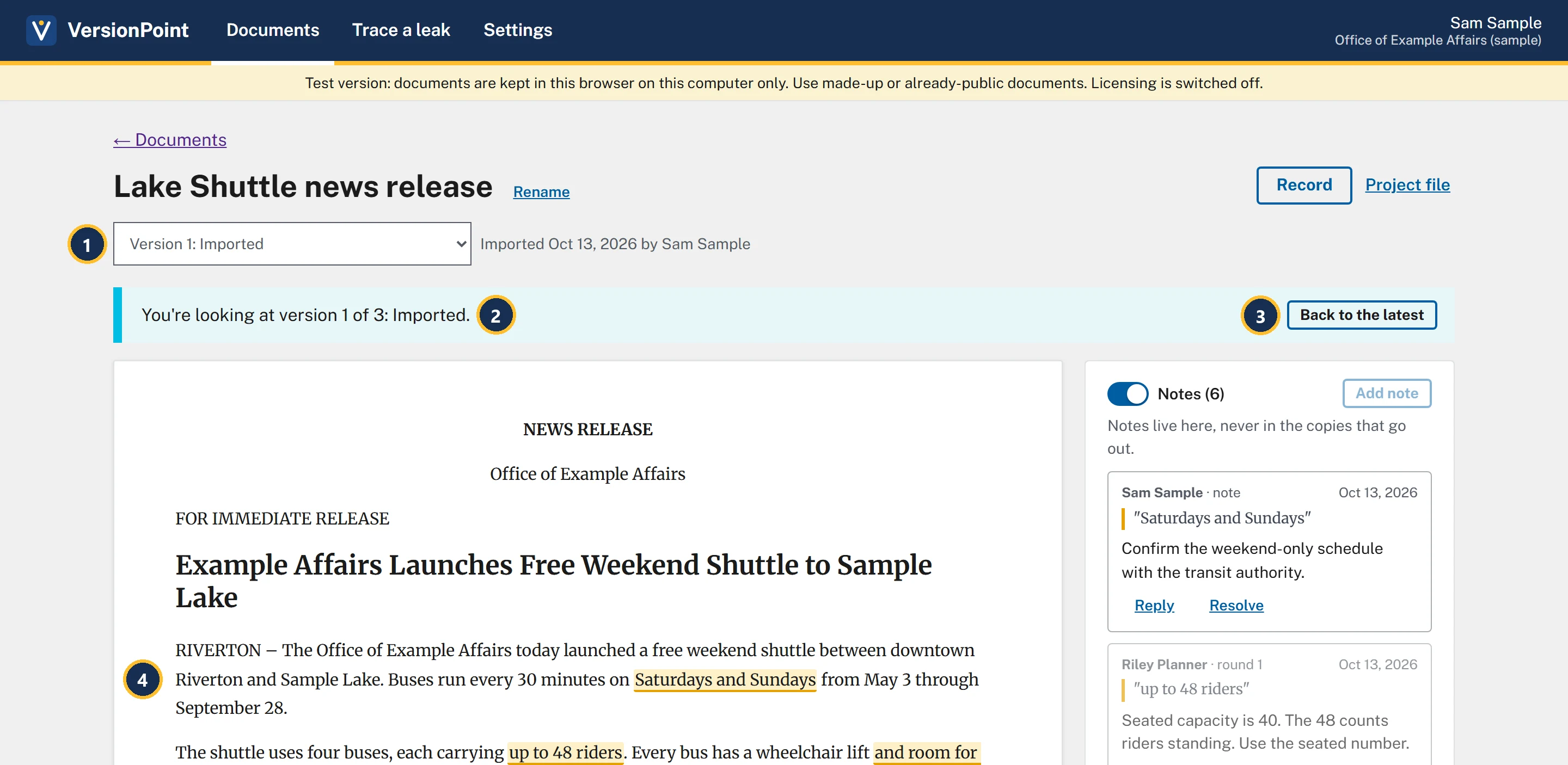
- The version list holds every version. Choose one to read it.
- You're looking at version 1 of 3: Imported. You can't send or edit an older version.
- Back to the latest returns to the current version.
- Version 1's words: every 30 minutes, through September 28.
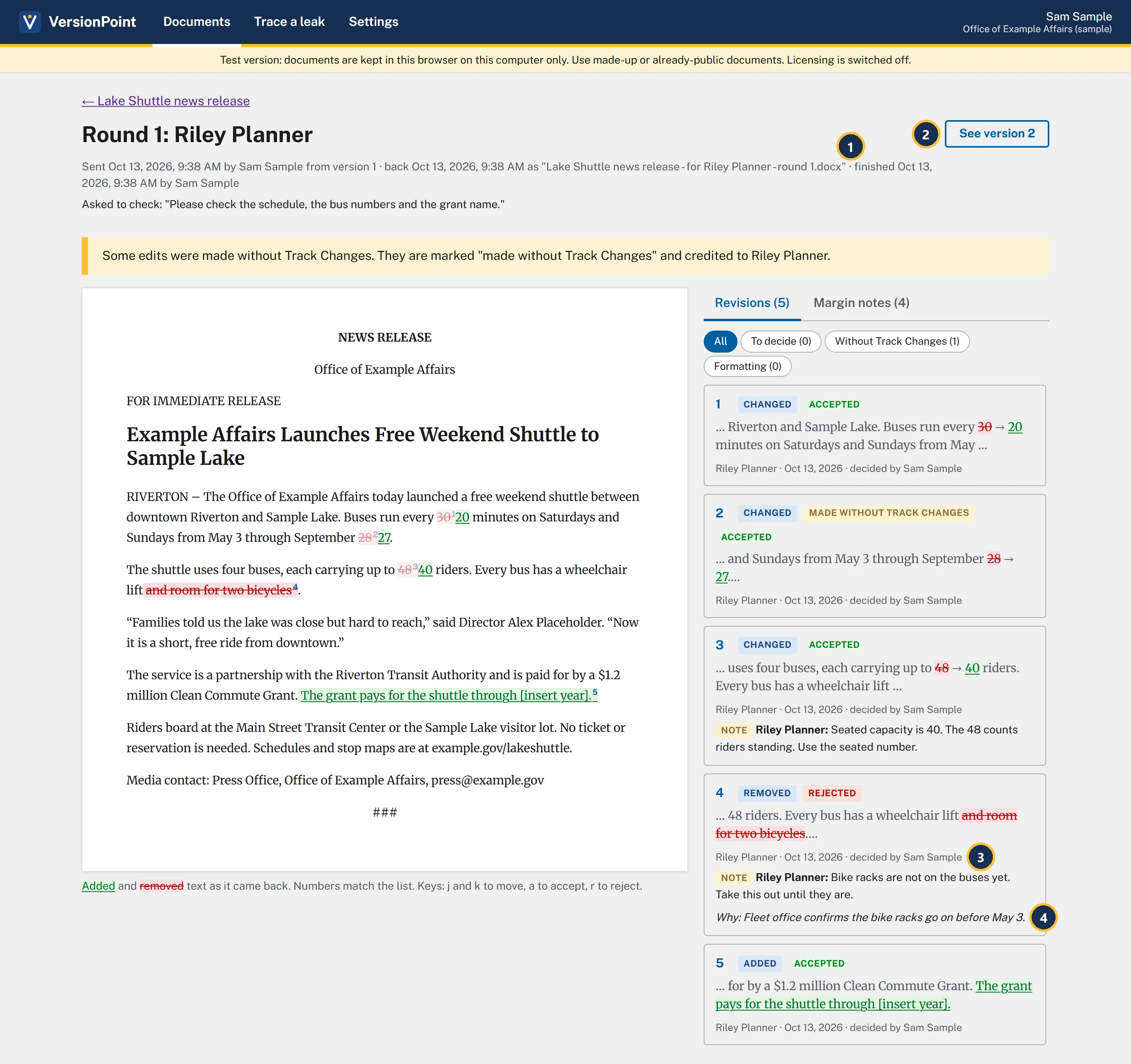
- finished with the date and who finished it.
- See version 2 opens the version this round made.
- Each card says who decided it: decided by Sam Sample.
- Your reason stays on the card, as Why: and your words.
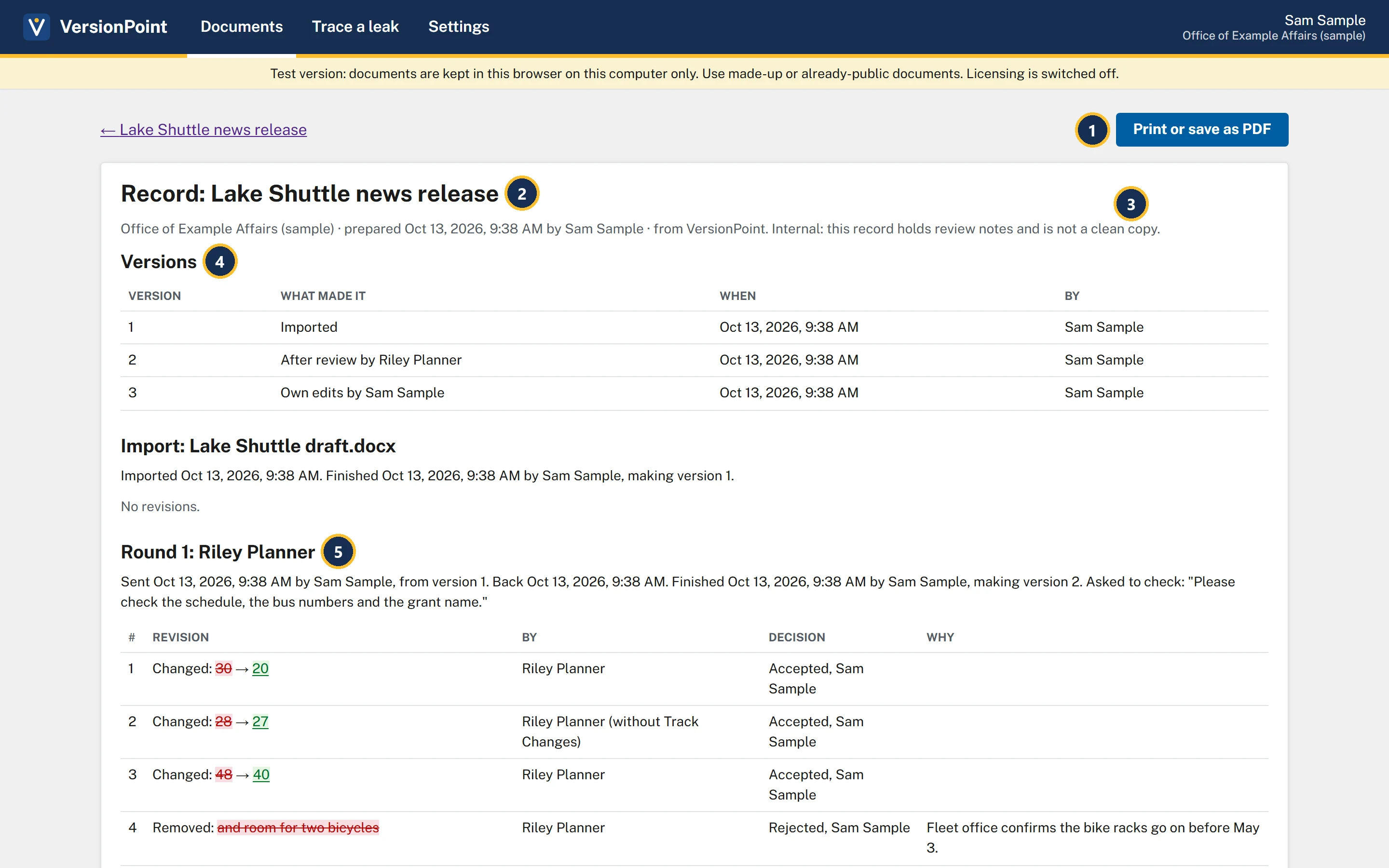
- Print or save as PDF opens your browser's print window. Choose a printer, or save as PDF for the file.
- The record is for one document, prepared by you, with the date and time.
- Internal: this record holds review notes and is not a clean copy. Keep it inside the office.
- Versions: what made each version, when, and by whom.
- One section for the import and each round: sent, back, finished, what the reviewer was asked to check, every revision with its decision and Why, then the margin notes.
At the end, Notes added in VersionPoint lists the notes and replies made in the app, like your reply on the grant note and your note on Saturdays and Sundays.
Keep a copy: "Project file"
VersionPoint keeps every document on this computer, in this browser. Project file on the document page downloads the document with its whole record as one file: Lake Shuttle news release.vpproj. It holds the versions, rounds, decisions, reasons and notes, so keep it with your other files for the release, as your backup of everything VersionPoint knows about it.
To bring a project file back in, choose Open a project file on Documents. It opens in any VersionPoint: here again after you clear this browser, or on another computer. Whoever opens it takes the document over, and the names in its record stay as they were. It never overwrites what you have: if this browser already has the document, as recent or more, it's turned away.
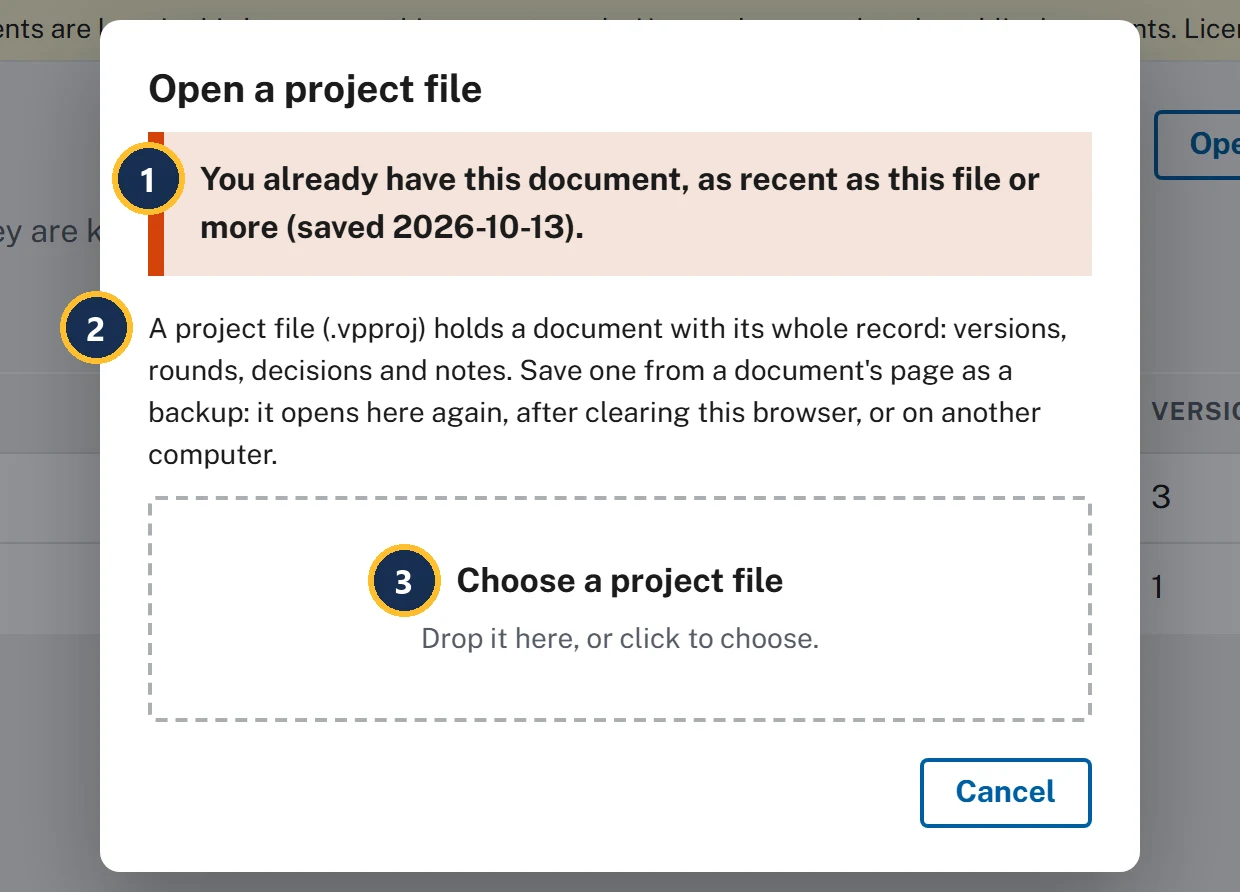
- Nothing is overwritten: You already have this document, as recent as this file or more, with the date it was saved.
- What a project file holds, and what it's for: a backup that opens here again after you clear this browser, or on another computer.
- Choose a project file: drop the .vpproj file here, or click to choose it.
Try it
Start on the document page of Lake Shuttle news release, version 3, where lesson 7 left you.
- Click the paragraph about the buses (The shuttle uses four buses…). How this paragraph got here opens, with Riley's two revisions in version 2, your reason on the rejected one, and both of Riley's notes.
- Choose Close, then click the first paragraph (the schedule). Under version 2, find 28 → 27 and made without Track Changes.
- Choose Close. In the version list, choose Version 1: Imported. The banner says You're looking at version 1 of 3: Imported. Choose Back to the latest.
- Under Rounds, choose Round 1: Riley Planner. The round opens read-only, with decided by Sam Sample on each card. Choose ← Lake Shuttle news release to go back.
- Choose Record. Find the Versions table (three versions), then round 1's table, with Rejected, Sam Sample and your reason on revision 4.
- Choose Print or save as PDF if you'd like a copy. Your browser's print window opens; cancel it or save the PDF.
- Choose ← Lake Shuttle news release, then Project file. Lake Shuttle news release.vpproj downloads. Keep it with your files for the release.
- Choose Documents at the top, then Open a project file, and choose the file you just downloaded. It's turned away: You already have this document, as recent as this file or more. Choose Cancel.
Check your work
![The record's Round 1: Riley Planner section. The line under the heading says it was sent by Sam Sample from version 1, came back, and was finished by Sam Sample, making version 2, and repeats what Riley was asked to check. The table lists five revisions: 1, Changed 30 to 20, Accepted, Sam Sample; 2, Changed 28 to 27, Riley Planner (without Track Changes), Accepted, Sam Sample; 3, Changed 48 to 40, Accepted, Sam Sample; 4, Removed: and room for two bicycles, Rejected, Sam Sample, Why: Fleet office confirms the bike racks go on before May 3; 5, Added: The grant pays for the shuttle through [insert year]., Accepted, Sam Sample. Below it, Margin notes lists who wrote each note, the words it is on and the note: Riley Planner on up to 48 riders, Riley Planner on and room for two bicycles, Riley Planner on Clean Commute Grant, and Drew Grants's reply on Clean Commute Grant.](assets/l8-check.webp)
Watch out for
Quick check
Pick an answer to see why it is or isn't right. Nothing is scored or sent anywhere.
Question 1
Your deputy director asks why the release says 40 riders when the vendor sheet says 48. What's the fastest answer?
Question 2
Records staff want everything about this release. What do you give them?
Lesson 9 shows how to find out which copy a leaked release came from, and who you gave it to.